
Workflow automation for small uk firms: a practical guide.

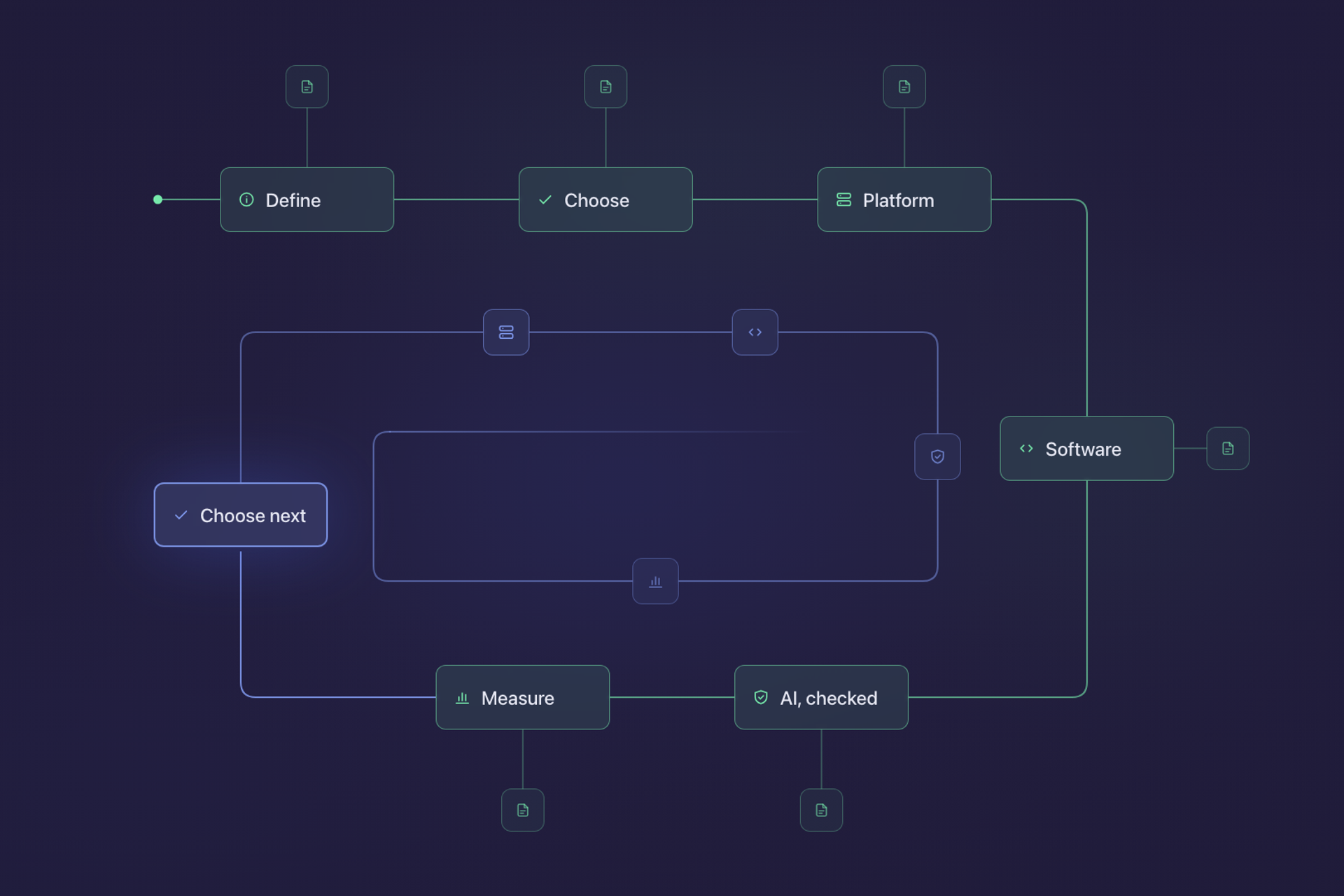
This is the guide we would hand to the owner of a ten-to-fifty-person firm who has decided the admin is costing too much and wants to know what to do about it, in order. It pulls together what we have written on each step separately, and links to the longer piece wherever a step deserves one.
It is written for the shape of business most of the UK actually is. Of the 5.7 million private sector businesses at the start of 2025, 99.85% had fewer than 250 employees, according to the Department for Business and Trade. Most of them have no developer on staff, a handful of systems that do not talk to each other, and somebody who spends part of every week copying information between them.
Step 1: know what automation is, and what it is not
Automation is a step somebody currently does by hand being done by software instead, on a rule your business sets. In a small firm that rarely means one large system. It means a handful of small handoffs: an enquiry that reaches the CRM without being retyped, a finished job that produces a draft invoice, a lapsed customer who appears on a list instead of being forgotten.
It is also not the same thing as AI, not a replacement for a person, not a fix for a process that does not work, and not a project with an end. Each of those misunderstandings costs money in a different way, and What Business Automation Actually Means for a Small Team takes them one at a time.
Step 2: choose the first task
The first automation should be frequent, run on rules rather than judgement, carry little judgement or let you lift it out, and fix a pain somebody can name. Frequency is what makes the arithmetic work. Ten minutes saved on a task done forty times a week comes to a little over 300 hours across a 46-week working year, while the same ten minutes on a quarterly task is forty minutes and not worth building.
Just as important is what to avoid: a process nobody agrees on, one about to change, one where the exceptions are the job, and one that lives inside a supplier's system you cannot reach. Start small rather than with the biggest process, because a small automation tells you in a fortnight whether your team adopts it and whether the saving was real. Where to Start With Workflow Automation sets out the four tests and the four traps in full.
Some firms do not get to choose. For accountancy practices, Making Tax Digital for Income Tax has required quarterly digital updates from sole traders and landlords over £50,000 since 6 April 2026, falling to £30,000 in April 2027 and £20,000 in April 2028. Collecting and checking client records four times a year instead of once is exactly the kind of frequent, rule-based work that belongs at the top of the list.
Step 3: decide where it should run
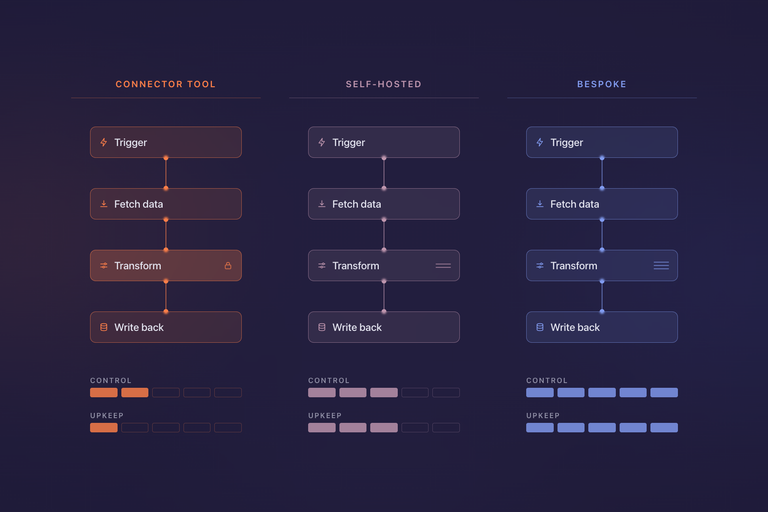
Once the task is chosen, it needs a home, and there are three. A connector tool such as Zapier runs on somebody else's infrastructure and is set up in an afternoon. A self-hosted workflow tool such as n8n does similar work on your own server, which changes both the cost at volume and where your data lives. Bespoke code is for logic that is genuinely particular to your business, work that has to be verifiable, or systems with nothing to connect to.
The cost comparison turns on units rather than headline prices. Zapier charges per completed action step and n8n per whole workflow run, so a multi-step workflow can be several times cheaper on one than the other at the same volume. In September 2026 Zapier's entry paid plan was $19.99 a month billed annually for 750 tasks, and n8n's Starter cloud plan was €20 a month billed annually for 2,500 executions, with its Community Edition free to self-host. Zapier, n8n, or Bespoke works through when each earns its place, and why most firms end up using more than one.
Step 4: know when the answer is software, not automation
Sometimes the task is not a handoff between systems at all, because the system you need does not exist. That is a different decision with a different cost profile: off-the-shelf tools carry limits you will work around, and custom builds carry costs that are easy to underestimate at the start. Build vs Buy: When Custom Software Makes Sense is the framework we use for that call, and it is worth reading before commissioning anything larger than an automation.
AI now sits inside most automation tools as one more kind of step, and it is good at a specific shape of work: turning unstructured information into structured information, first drafts of formulaic documents, and reading more text than anybody has time for.
Step 5: put AI where it can be checked
AI now sits inside most automation tools as one more kind of step, and it is good at a specific shape of work: turning unstructured information into structured information, first drafts of formulaic documents, and reading more text than anybody has time for.
Smaller firms are adopting it, only more slowly. The Office for National Statistics found 28% of businesses with fewer than ten employees reporting some AI use in June 2026, against 49% of those with 250 or more.
The limit that matters is how it fails. A model's characteristic failure is a confident, well-formatted, plausible wrong answer, and the value of any AI step is capped by how quickly somebody can check its output. Put AI where checking is fast and a wrong answer is survivable, keep a named person on anything that sends, pays or deletes, and treat it as a step in a workflow rather than a replacement for one. AI Agents: What They Can and Cannot Do Yet covers where the technology stands and the four conditions a task should meet before you hand it over.
Step 6: measure it, then pick the next one
Write down four numbers before anything changes: how long the task takes, how often it happens, how often it goes wrong, and who does it. Agree what you expect to be different in the same terms, and check a month after launch rather than a week, when the teething problems and the novelty have both worn off. Check, too, whether people are actually using it, because the commonest quiet failure is a team carrying on the old way alongside the new one.
If the first automation paid for itself, the measurement tells you roughly what the next one is worth. If it did not, you have learnt that in a month rather than a year, on something small enough to switch off.
How this looks in the firms we work with
The sequence is the same everywhere, but the first task differs by sector, and it is usually the one that repeats most and carries the least judgement.
In an accountancy or bookkeeping practice it is the quarterly cycle of collecting, chasing and checking client records under Making Tax Digital. In a recruitment agency it is candidate admin around the applicant tracking system: parsing CVs into records, scheduling interviews and keeping candidates updated. In a solicitors' practice doing volume work such as conveyancing or probate, it is the document handling that repeats from one matter to the next, with a fee earner owning every output. In an insurance broker it is getting enquiry and renewal information into the right system without it being keyed twice. And in an event organiser it is keeping registrations, the event app and the CRM in step, which is the case behind our Innovation Zero API project.
Across all of them, the most useful thing a small firm can have is its own documents and records findable by the tools its staff already use, rather than hunted through by hand. Most of the steps above are a route to that.
Where to go from here
Pick one task this week that somebody names without hesitating when asked what wastes their time, and write down the four numbers. That is the whole of step one, and it costs an afternoon.
If you would rather talk it through, that is most of what we do: small automations scoped one at a time, each expected to pay for itself before the next is worth buying, on whichever layer is the cheapest that will hold.
Got a project in mind?
Or just want to talk through an idea? We are always happy to chat, no strings attached.