
Accessibility is now a baseline, not a nice-to-have.

Web accessibility has spent twenty years on the wrong list. It sat with the things you would get to eventually, somewhere below the new brochure and above the office plants, and it stayed there because nothing ever forced the issue. That has changed, and most small businesses have not noticed, because the change did not arrive as a letter addressed to them.
What changed last June
The European Accessibility Act came into force on 28 June 2025, setting accessibility requirements for products and services sold to consumers. Whether your own site sits inside it depends on what you sell and to whom, which is a question worth putting to somebody who can answer it properly rather than assuming the answer is no.
The part that catches UK businesses is how scope is decided. It applies on the basis of where your customer is, not where you are, so leaving the EU did not take a UK company out of it. If you sell to consumers in an EU member state you are in scope, whether your office is in Manchester or Madrid.
The technical benchmark is WCAG 2.2 Level AA, a published standard rather than a matter of taste. That is unusually helpful here, because it means accessible has a definition you can hand to a developer and check against, instead of being a judgement call argued about after the invoice.
There is a transitional period, and services already in operation before 28 June 2025 have until 28 June 2030. That is real breathing room and worth knowing about, though five years passes faster on a website than it does almost anywhere else, and anything you build new does not get it.
Enforcement carries financial penalties, set by individual member states rather than centrally, so the amounts vary and the figures circulating in supplier marketing are worth treating carefully. The honest summary is that this is enforceable and what it costs you depends on where the complaint lands.
The part that was already true here
None of this is the first obligation a UK business has. The Equality Act 2010 requires reasonable adjustments for disabled customers, and it predates all of the above by fifteen years. A website a blind customer cannot use to buy from you has been a problem in this country since long before anyone in Brussels wrote anything down.
That is worth sitting with, because it changes what the last year actually means. The obligation is not new; what is new is a specific technical standard, a date attached to it, and somebody with an interest in enforcing it. Businesses that treated accessibility as optional were not misreading the law, they were reading the enforcement, and the enforcement is what moved.
What accessible actually means
The word makes people picture a stripped-back, ugly version of their site built for a small group of users.
The word makes people picture a stripped-back, ugly version of their site built for a small group of users. That is not what the standard asks for and it is not what the work looks like.
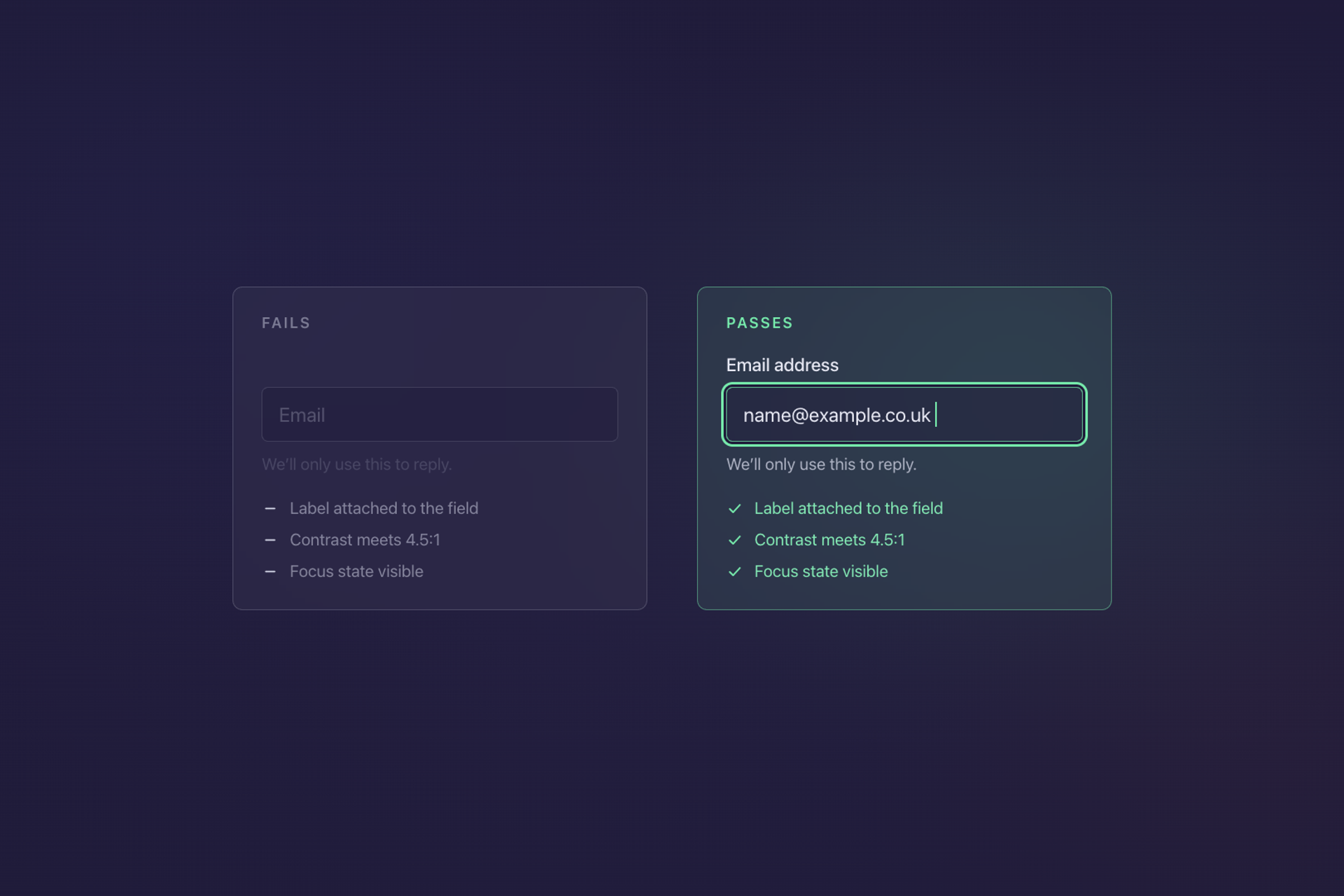
Most of WCAG 2.2 Level AA is unglamorous. Text has enough contrast against its background to be read in daylight. Every form field has a label attached to it in the markup, not just a grey word floating above it. Images that carry meaning have a text description, and images that are decoration are marked as decoration. The site works with a keyboard alone, in a sensible order, which is what people using screen readers and people with limited hand movement both rely on. Video has captions, and nothing depends on colour by itself to make its point, so a red border round a field comes with words saying what is wrong.
Read that list again and notice how much of it is ordinary quality. A form nobody can complete on a phone with one hand loses you sales from people with no impairment at all. Contrast that fails the standard also fails a customer reading on a train in bright sunlight. The overlap between accessible and simply well built is far larger than the conversation usually admits.
What to do first
Do not commission an accessibility project, because that is how this turns into a large quote for work you have no way to assess.
Run an automated check first, since free tools will scan a page and hand you a list. They miss a good deal of what matters, but what they do catch is cheap to find and frequently cheap to fix. Contrast failures and missing image descriptions come up constantly and neither is expensive work.
Then test the two things automated tools cannot. Put the Tab key through your own checkout or enquiry form and see whether you can complete it without touching the mouse. Then do the same with the sound on and a screen reader running, which is built into every operating system you already own. Both take twenty minutes and both tell you more than a report will.
Fix what those two exercises surface, in the order of how much money each page is responsible for, since your checkout matters more than your about page.
Then, when you next redesign, put WCAG 2.2 Level AA in the brief as a requirement rather than a preference, and ask your supplier how they intend to demonstrate it. Building it in costs little. Retrofitting it costs a great deal, which is the whole reason it keeps being deferred, and the reason deferring it again is the expensive choice.
That is the part we would push you on hardest. We build to that standard as a matter of course rather than as a line you add to the quote. Everything on the list above is close to free while the markup is being written, and awkward once it has set. If a redesign is anywhere on your plans this year, that is the moment this gets cheap.
Azeem Hadi
Got a project in mind?
Or just want to talk through an idea? We are always happy to chat, no strings attached.
Thirty minutes, direct with the founder. No pitch deck.